
The gap between 'I have a working tool in the Inspector' and 'this is running in production with real clients' is where most MCP server builds stall out. Transport config, auth, and per-client behavior differences are the usual culprits. This guide covers all of it so you can build an MCP server that holds up end to end.
TLDR:
- MCP servers expose tools, resources, and prompts via JSON-RPC; you control what's callable, clients decide what to call
- Use stdio for local clients like Claude for Desktop and Cursor; use Streamable HTTP for any remote or marketplace deployment
- The older HTTP+SSE transport is deprecated; migrate before submitting to the ChatGPT App Store or Claude Connectors
- OAuth 2.1 misconfiguration (wrong redirect URI, API keys in query params) is the most common marketplace rejection trigger
- Manufact runs automated conformance checks across all six requirement groups before you submit, with the fastest approval on record at 4 days
What MCP Is and Why You're Building a Server
MCP is an open protocol that connects AI clients to external tools and data. The client sends JSON-RPC requests; your server responds by exposing tools, resources, and prompts. See what MCP apps are if you need background before the build steps.
The server side is where you have control. Clients like Claude and ChatGPT decide what to call, but you define what's callable. As of the July 2026 spec release, Tier 1 SDKs are seeing close to half a billion downloads per month, with TypeScript and Python each crossing 1 billion total downloads.
Core MCP Concepts: Tools, Resources, and Prompts
MCP servers expose three primitive types. Understanding them before writing code saves you from restructuring later.
- Tools are callable functions the LLM can invoke. A
get_weather(city: str)function registered as a tool means Claude can call it mid-conversation and act on the result. - Resources are file-like data clients can read: a database query result, a file's contents, an API response. Clients pull these without triggering side effects.
- Prompts are reusable message templates your server registers so clients can surface them as slash commands or quick-start options.
Most servers start with tools only. Add resources and prompts once the core logic is working.
Choosing Your Transport: stdio vs. Streamable HTTP
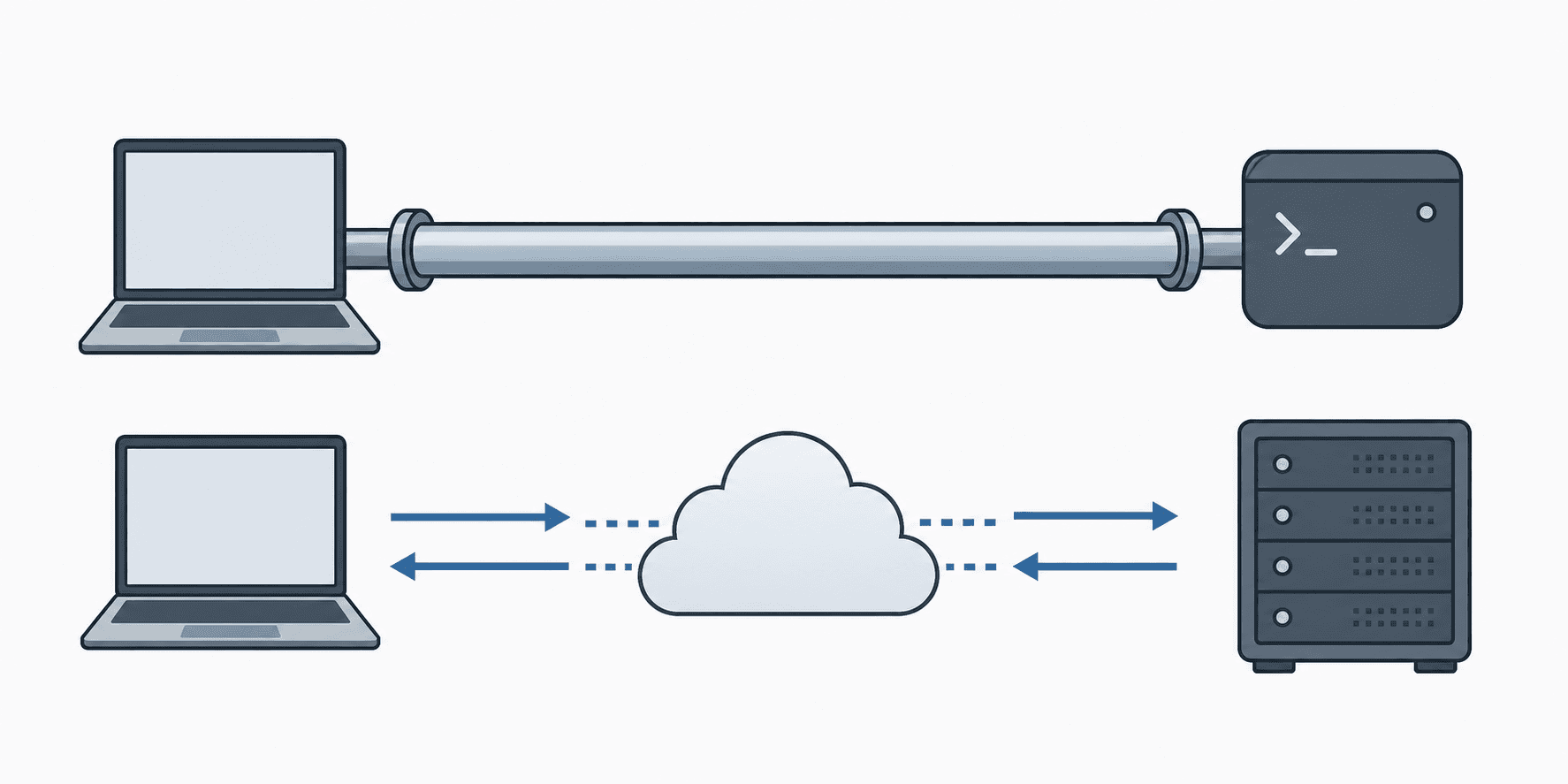
The 2026-07-28 spec defines two standard transport bindings.
stdio runs your server as a subprocess. The client launches it, writes JSON-RPC messages to stdin, and reads responses from stdout. Zero network config, zero auth surface. Use this for local tools, CLI integrations, and desktop clients like Claude for Desktop or Cursor.
Streamable HTTP is the production transport. Every message is an HTTP POST to a single MCP endpoint. Replies come back as a JSON object or a request-scoped SSE stream. Use it for remote servers, multi-tenant deployments, or anything you plan to host publicly. If you're building for the ChatGPT App Store or Claude Connectors marketplace, Streamable HTTP is required: those clients connect over the network and do not support stdio.
The older HTTP+SSE transport is now deprecated. Migrate before submitting to either marketplace.
Choosing Your SDK and Language
This guide uses the mcp-use SDK, the full-stack TypeScript framework for MCP. You import MCPServer from mcp-use and register tools with server.tool(). It handles JSON schema generation, input validation, transport, and auth around your application code.
A few reasons it fits this build:
- TypeScript runs in the browser, so it is the only option for MCP App Views. Returning interactive React components inside Claude or ChatGPT requires JavaScript. See the guide on deploying an MCP TypeScript server to production.
- Tool inputs and outputs accept any Standard Schema validator. Generated projects use Zod, and ArkType or Valibot work without changing the registration API.
- The server is stateless Streamable HTTP by default, and the
mcp-useCLI owns the dev server, build, and production listener.
Scaffold a project with create-mcp-use-app, decorate a function as a tool, and the SDK generates the wire schema and transport for you.
Setting Up Your Environment
Node 18+ required. Check your version first:
node --version # need 18+The recommended path scaffolds a project with everything wired:
npx create-mcp-use-app@latest my-mcp-server
cd my-mcp-server
npm install
To add mcp-use to an existing project instead:
npm install mcp-use zodProject Layout
A TypeScript mcp-use project needs at minimum:
my-mcp-server/
├── src/
│   └── index.ts
├── views/
├── package.json
└── tsconfig.jsonsrc/index.ts holds the server with a default export. The views/ directory contains React Views returned by your tools.
Building Your First MCP Server
A single runnable mcp-use server you can copy and start immediately.
TypeScript (mcp-use)
import { MCPServer } from "mcp-use";
import { z } from "zod";

const server = new MCPServer({ name: "weather", version: "1.0.0" });

server.tool(
  {
    name: "get_weather",
    description: "Return a weather forecast for a city.",
    inputSchema: z.object({ city: z.string() }),
  },
  async ({ city }) => ({
    content: [{ type: "text", text: `The weather in ${city} is sunny.` }],
  })
);

export default server;
Run the dev server:
npm run devThis starts the MCP endpoint at /mcp and the Inspector at /mcp/inspector locally. Tool registrations and Views hot-reload as you edit, so changes appear in the Inspector without a restart.
Implementing Resources and Prompts
Tools handle actions. Resources and prompts cover the rest.
Resources
A resource exposes data a client can read without triggering side effects. Register one with a URI:
import { MCPServer } from "mcp-use";

const server = new MCPServer({ name: "my-server", version: "1.0.0" });

server.resource(
  { name: "config", uri: "data://config" },
  async () => ({
    contents: [{ uri: "data://config", text: '{"version": "1.0", "env": "production"}' }],
  })
);
For variable data, use a URI template:
server.resource(
  { name: "user-profile", uri: "users://{user_id}/profile" },
  async ({ user_id }) => ({
    contents: [{ uri: `users://${user_id}/profile`, text: `{"id": "${user_id}", "plan": "pro"}` }],
  })
);
The client fetches users://42/profile and gets the profile back with no side effect.
Prompts
Prompts are reusable message templates clients can surface directly:
import { z } from "zod";

server.prompt(
  {
    name: "summarize-report",
    argsSchema: z.object({ report_id: z.string() }),
  },
  async ({ report_id }) => ({
    messages: [
      {
        role: "user",
        content: { type: "text", text: `Summarize report ${report_id} in three sentences.` },
      },
    ],
  })
);
Claude or ChatGPT can surface this as a slash command or pre-fill. The client calls prompts/get with report_id as an argument and receives the templated message ready to send.
Testing Your Server Locally with MCP Inspector
Run the mcp-use dev server before connecting any real client:
npx @modelcontextprotocol/inspector python server.py

npx @modelcontextprotocol/inspector npx ts-node src/index.tsnpm run dev
The built-in Inspector opens at http://localhost:51733000/mcp/inspector, lists every registered tool and resource, and lets you fire test calls manually. A successful get_forecast call returns something like:
{
  "content": [{ "type": "text", "text": "Forecast for London over 3 days: sunny." }],
  "isError": false
}
The raw JSON-RPC exchange appears in the right panel. If a tool input fails validation, the exact field that failed shows up there before any real client surfaces it.
Connecting to a Real Client
Once your Inspector tests pass, wire the server to a real client.
Claude for Desktop (stdio)
Edit claude_desktop_config.json (found at ~/Library/Application Support/Claude/ on macOS):
{
  "mcpServers": {
    "weather": {
      "command": "python",
      "args": ["/absolute/path/to/server.py"]
    }
  }
}
Restart Claude for Desktop. Your tools appear in the tool picker automatically.
Cursor (stdio)
In Cursor's MCP settings, add the same command/args structure. Cursor launches the subprocess on startup.
Streamable HTTP clients
For remote servers, clients connect via URL:
https://your-server.com/mcpPass that endpoint into whichever client's MCP configuration accepts a URL. No subprocess needed.
One caveat worth knowing: every client parses tool schemas, handles auth flows, and negotiates capabilities differently. A tool that works in Claude for Desktop may behave differently in Cursor or ChatGPT, so test against each client profile you plan to support.
Authorization and Security
MCP authorization follows OAuth 2.1. The spec marks it optional but strongly recommends it when your server touches user-specific data, needs an audit trail, or runs in an enterprise environment.
The client redirects through an authorization server, receives a token, then passes it in the Authorization header on every subsequent request. Your server validates the token before executing any tool.
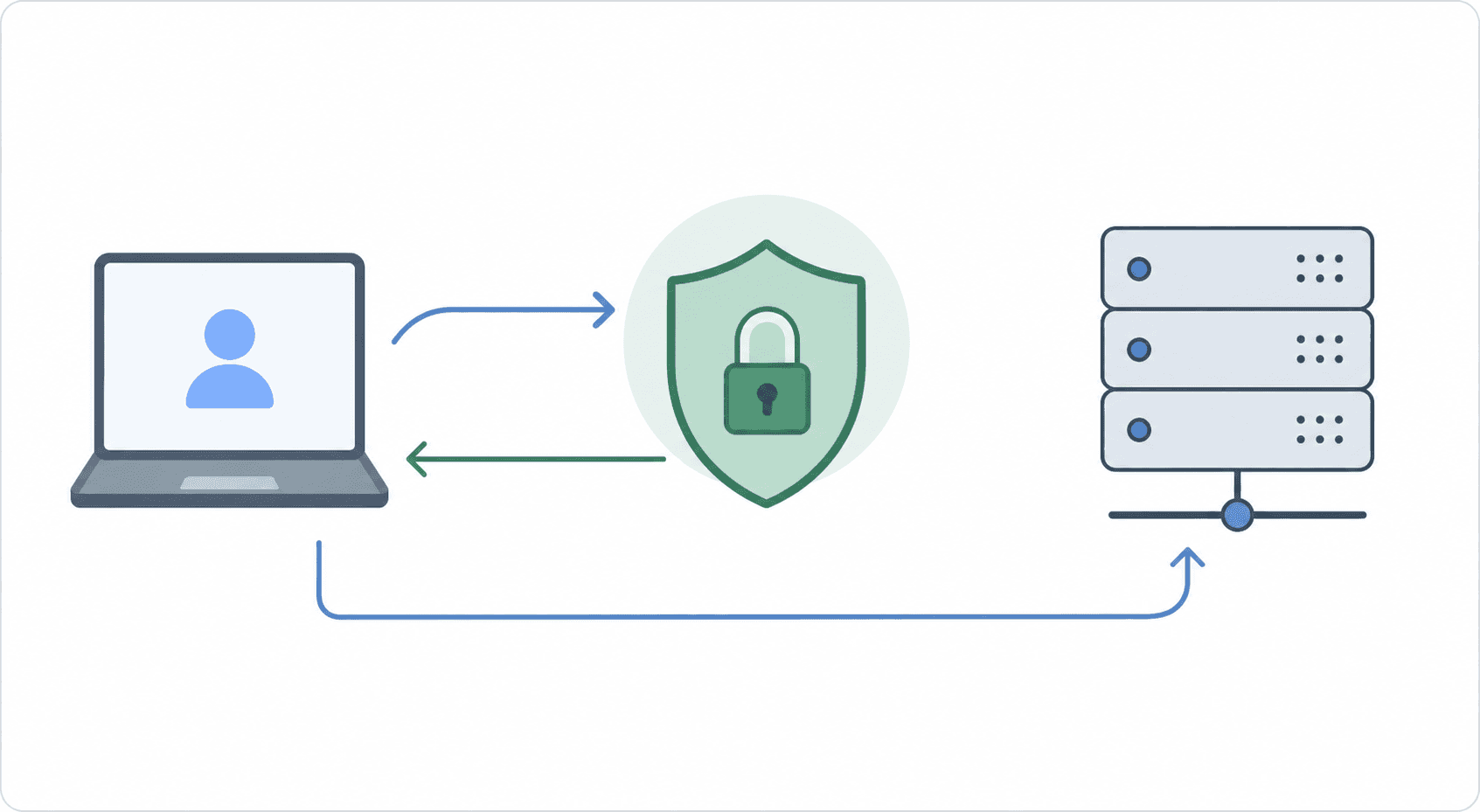
The most common mistake is putting an API key in the URL as a query parameter. That key ends up in logs, browser history, and server access records. For a full walkthrough, see OAuth setup for MCP servers.
Production Considerations: Error Handling, Logging, and Rate Limiting
Four things break MCP servers in production that never surface locally: unhandled exceptions, unstructured logs, silent rate-limit failures, and missing per-client timeout handling.
Error Handling
Raising an exception crashes the tool call from the client's perspective. Return an error content block instead:
server.tool(
  "get_data",
  { id: z.string().optional() },
  async ({ id }) => {
    if (!id) {
      return { content: [{ type: "text", text: "Error: id is required" }], isError: true };
    }
    return { content: [{ type: "text", text: `Data for ${id}` }] };
  }
);
The client surfaces an isError: true response as a tool failure message instead of an unhandled exception.
Logging
Log every tool call with a request ID and session context. Plain print()console.log statements give you nothing to filter on when something fails. Structured JSON with tool_name, session_id, duration_ms, and error fields lets you grep or query across requests.
Rate Limiting
Wrap external API calls with retry logic and surface the limit as a tool error:
async function callExternalApi(query: string) {
  for (let attempt = 0; attempt < 3; attempt++) {
    const response = await api.get(query);
    if (response.status === 429) {
      await new Promise((r) => setTimeout(r, 2 ** attempt * 1000));
      continue;
    }
    return response.json();
  }
  return null;
}
Never let a 429 propagate as an unhandled exception.
Deploying Your MCP Server Remotely
Moving from stdio to a live endpoint requires TLS, a stable hostname, and a persistent process. The server also needs to switch to Streamable HTTP transport.
There are a few MCP-specific deployment details worth getting right before you push:
- Transport: deploy the same mcp-use server without any transport changes;
mcp-use buildandmcp-use startown the HTTP listener and serve the/mcpendpoint automatically - TLS: required by every production client; most hosts provision certificates automatically
- OAuth redirect URIs: must match your production domain exactly, since mismatches cause auth failures that are hard to debug
- Session stickiness: the 2026-07-28 spec makes stateless Streamable HTTP the default, which removes most of this concern for standard deployments
Common Deployment Targets
| Target | Notes |
|---|---|
| Cloudflare Workers | Free at small scale, native Streamable HTTP support |
| Railway or Fly.io | Container-based, straightforward for Python and Node servers |
| VPS with Docker | Full control, more ops overhead |
Set up branch preview URLs before you merge. They give you a live HTTPS endpoint per branch so you can connect Claude or ChatGPT to the actual deployment, or use the mcp-use tunnel to test against real clients before any hosting is in place.
Getting Listed on Claude Connectors and the ChatGPT App Store
Marketplace submission has its own requirements, separate from getting your tools to work locally. For the full distribution strategy, see distributing your MCP server across marketplaces.
Both the ChatGPT App Store and Claude Connectors check conformance before review starts. Your server needs to complete the MCP handshake correctly, return well-formed tool schemas, declare capabilities accurately, and serve over TLS with a stable hostname. Tool names must be unique, descriptions must be accurate, and any read/write separation in your tools needs to be reflected in your capability flags.
OAuth 2.1 is the most common rejection trigger. Reviewers will attempt an auth flow against your production endpoint. If the redirect URI doesn't match, the token exchange fails, or you've shipped API keys in query parameters, the review fails and you're back in queue. Review cycles typically run several weeks per attempt. See how PredictLeads avoided a lengthy MCP marketplace review by running conformance checks before submission.
Asset requirements include a working demo, accurate listing copy, and for ChatGPT submissions, structured JSON describing each tool and its intended behavior. The ChatGPT MCP app submission guide covers each field. Claude Connectors has its own metadata format. Neither store publishes a complete pre-submission checklist publicly, so most teams find gaps during review.
The fastest approval on record through Manufact's submission checks was 4 days. Running automated conformance checks against both stores' requirements before you submit is the most reliable way to avoid the multi-week retry loop.
How Manufact Fits Into the MCP Server Lifecycle
Manufact is the team behind mcp-use, the open-source MCP framework with 10,600+ GitHub stars and 10M+ downloads.
Manufact Cloud runs on top of everything covered in this guide. Connect a GitHub repo and a push deploys to live in under a minute. Branch preview URLs run against real MCP clients (ChatGPT, Claude, Cursor) so transport and auth issues surface before merge. Automated publishing checks cover protocol compliance, tool schemas, error handling, and metadata quality. The Submission Pack generator produces listing copy, reviewer test cases, and visual assets in each store's required format.
The Cloud Inspector captures 100% of tool calls with p50 under 5ms overhead and 30-day trace retention on paid plans. See how AgentMail handles 100k+ agent tool calls using this infrastructure. Latency is reported at p50/p95/p99 per tool and per client with no SDK changes required.
The free tier is $0 with no credit card required. The Startup plan is $250/month billed annually.
Final Thoughts on Building an MCP Server with the mcp-use SDK
You have a working path to a deployed, marketplace-ready MCP server. The 2026-07-28 spec is the current release; the mcp-use SDK has 10,600+ GitHub stars and 10M+ downloads. Start local, test with the Inspector, and deploy when your tool schemas pass clean. Manufact runs automated conformance checks across all six requirement groups before you submit.
FAQ
What's the difference between FastMCP and the raw MCP Python SDK for building a server?
FastMCP generates schemas from type hints and wires transport automatically. The raw SDK gives direct control over every detail. Use FastMCP for fewer moving parts.
How do I build a remote MCP server that works with the ChatGPT App Store and Claude Connectors marketplace?
Switch from StdioServerTransport to Streamable HTTP, expose a single /mcp endpoint, provision TLS, and implement OAuth 2.1 with redirect URIs that match your production domain exactly. Both marketplaces connect over the network and require the Streamable HTTP transport. The older HTTP+SSE transport is deprecated and will fail conformance checks.
What should I test before connecting my MCP server to Claude or ChatGPT in production?
Run npx @modelcontextprotocol/inspector python server.py (or the TypeScript equivalent) to verify every tool schema, resource URI, and prompt template locally first. After that, test against each client profile you plan to support. ChatGPT, Claude, and Cursor parse tool schemas and handle auth flows differently, so a tool that passes the Inspector may behave differently across clients.
How do I create an MCP server in Python using FastMCP?
Install with pip install fastmcp, create a FastMCP instance, and decorate functions with @mcp.tool. FastMCP reads the type hints to generate the JSON schema automatically, so no manual schema definition is needed. Call mcp.run() to start the server on stdio, or pass an HTTP transport for remote deployment.
What's the fastest way to get an MCP server listed on the Claude Connectors marketplace or the ChatGPT App Store?
Run automated conformance checks across all six requirement groups (protocol, tool schemas, security, metadata, domain, and assets) before you submit. Review cycles run several weeks per attempt. OAuth misconfiguration and malformed tool schemas are the most common causes of rejection.