People keep asking two versions of the same question: can MCP return a real interface, and if so how do I build one? The short answer is yes. An MCP app is an MCP server whose tools return interactive UI, and the host (ChatGPT, Claude, and others) renders that UI inline in the conversation. This is now an official part of the protocol. Here is how it got there, how it works, when to use it, and how to ship one.
How we got here
MCP started as a way to give models tools. In about eighteen months it grew a UI layer and made it official.
- Nov 2024
Anthropic's open standard connects models to tools and data. Results come back as text only.
- May 2025
Ido Salomon's open-source project returns interactive HTML over MCP, before any platform supports it.
- Oct 2025
OpenAI brings app UIs to ChatGPT, built on MCP rather than a separate protocol.
- Late 2025
ChatGPT starts accepting app submissions and Claude grows its connector directory.
- Jan 2026
SEP-1865 merges as the first MCP extension (
io.modelcontextprotocol/ui): one UI standard any host can render.
Why this matters
The chat is becoming the place people work. Claude, Claude Code, Codex, and Cursor are turning into the surface where more and more of the day happens, the way the browser was for the last two decades. If those agents are the new browsers, MCP is how the rest of the software world plugs into them: the new websites. People increasingly expect their agent to reach into the products they already use and act on that context without leaving the conversation. An MCP app is how your product shows up in that surface with its own interface instead of a wall of text.
If you do not believe me, believe PG:
The store is a new distribution channel
Getting listed matters for a simple reason: it makes installing your server one click. The way you add a server by hand today is rough. A user pastes a block of JSON into a config file, points it at the right command or URL, and restarts the client. Developers manage. Most people do not: a JSON config file is not something a typical user knows how to edit, and custom connectors are fiddly to set up even for engineers. A store listing collapses all of that into a single button.
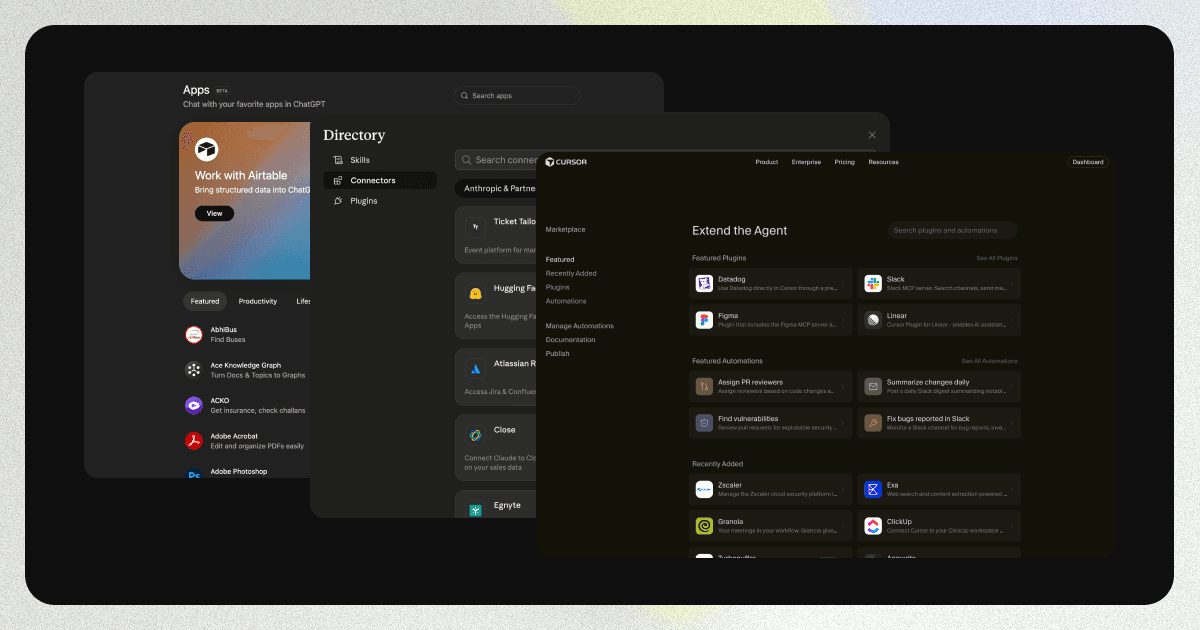
Being absent is the real risk. The store is a new front door to your product, and if your competitor is listed and you are not, the agent recommends and installs them while you are never part of the conversation.
Listing also unlocks discovery. The agent can propose your app the moment a request matches what it does, before the user has added anything. Claude already does this progressive discovery. We expect ChatGPT to follow: we hear they have been running experiments and tuning the experience.
Discovery makes visibility its own discipline. Just as the web grew SEO, MCP apps create a new surface to optimize: how your app is described, and whether the agent proposes it over the alternatives. Tools like appdiscoverability.com are starting to focus on exactly this.
How it works: from a tool call to a UI resource
A UI lives on the server as a resource: a chunk of sandboxed HTML addressed by a ui:// URI. A tool result points at that resource through _meta.ui.resourceUri. When the model calls the tool, the host reads the resource, renders it in a sandboxed iframe, and hands the widget the tool's structured data. From there the widget can call back into the host.
With mcp-use you do not assemble that metadata by hand. You declare a tool, attach a widget, and return props for the UI plus output for the model:
import { MCPServer, widget, text } from "mcp-use/server";
import { z } from "zod";

const server = new MCPServer({ name: "shop", version: "0.1.0" });

server.tool(
  {
    name: "search_catalogue",
    description: "Find products in the catalogue.",
    schema: z.object({ query: z.string() }),
    widget: { name: "catalogue" }, // resources/catalogue/widget.tsx
  },
  async ({ query }) => {
    const products = await db.search(query);
    return widget({
      props: { products }, // data the widget renders
      output: text(`Found ${products.length} products.`), // text the model reads
    });
  },
);
The widget is the other half, and with mcp-use it is just a React component. You read the data with useWidget() and render whatever you want:
// resources/catalogue/widget.tsx
import { useWidget } from "mcp-use/react";

export default function Catalogue() {
  const { props } = useWidget(); // the { products } the tool returned

  return (
    <div className="grid grid-cols-3 gap-3">
      {props.products.map((p) => (
        <article key={p.id} className="rounded-lg border p-3">
          <img src={p.image} alt={p.name} />
          <h3>{p.name}</h3>
          <p>{p.price}</p>
          <button onClick={() => addToCart(p.id)}>Add to cart</button>
        </article>
      ))}
    </div>
  );
}
No template DSL, no sandboxed markup language to learn. It is the React you already write, with the libraries and styling you already use, and no limits on what you can build.
mcp-use bundles that component into the ui://widget/catalogue.html resource and attaches the _meta keys hosts expect. Here is what it produces. Run the prompt below, then flip between Without UI and With UI.
Analytics is the case that is hard without UI. A column of numbers in a chat is hard to read. The same tool call rendered as cards and a chart is legible at a glance.
Show the user one thing, tell the model another
A tool returns two separate things: props, the data the widget renders, and output, the text the model reads. They do not have to match. So you can show the user a full record while telling the model only a redacted summary. Run this and flip to What the model sees:
- [email protected]
- Card
- 4929 1842 0073 4242
- Total
- $248.00
The full email and card show here in the UI. Flip to What the model sees — those fields are redacted before they ever reach the model.
server.tool(
  {
    name: "get_customer",
    schema: z.object({ orderId: z.string() }),
    widget: { name: "customer-card" },
  },
  async ({ orderId }) => {
    const record = await db.getCustomer(orderId);
    return widget({
      props: record, // the widget renders the full record, including PII
      output: text(`Order ${orderId}: ${record.name}, Gold tier, shipped.`), // the model reads only this
    });
  },
);
The user sees the email and card number in the card. The model is told a one-line summary and never receives the sensitive fields.
What a widget can do: the primitives
The widget runs in a sandboxed iframe and talks to the host over a set of ui/* JSON-RPC methods defined by the official extension. These are the standard primitives, shared across hosts:
| Capability | MCP Apps method | Direction | What it does |
|---|---|---|---|
| Handshake | ui/initialize | View → Host | Negotiate capabilities and receive host context (theme, locale, display mode, dimensions). |
| Receive tool args | ui/notifications/tool-input | Host → View | The arguments the tool was called with. |
| Receive tool result | ui/notifications/tool-result | Host → View | The structuredContent the widget renders from. |
| Send a follow-up message | ui/message | View → Host | Post a message into the chat as if the user sent it. |
| Share context with the model | ui/update-model-context | View → Host | Push UI state (selections, edits) into the model's context for later turns. |
| Call a tool | tools/call | View → Host | Trigger a server tool from a click in the UI. |
| Open an external link | ui/open-link | View → Host | Hand a vetted URL to the browser. |
| Change display mode | ui/request-display-mode | View → Host | Switch between inline, fullscreen, and pip (picture-in-picture). |
| Report size | ui/notifications/size-changed | View → Host | Tell the host the content's rendered height. |
| React to host changes | ui/notifications/host-context-changed | Host → View | Theme, locale, display mode, or container size changed. |
Two of these are worth seeing in motion, on the same catalogue.
ui/message lets the widget continue the conversation. Click Learn more on a product and the widget posts a message into the chat, as if you typed it.
Click Learn more. The widget calls ui/message and the message appears here, as if you typed it.
ui/update-model-context keeps the model in sync with what the user is doing. Add items to the cart and watch the context the model sees update live, so the next thing you ask can refer to it.
The model knows the cart holds nothing yet.
ui/update-model-context
{
  "cart": []
}
Add or remove items. The widget pushes the cart to the model with ui/update-model-context, so when you ask “what's my total?” the model already knows.
OpenAI's Apps SDK is one implementation of this. It exposes the same capabilities through a window.openai bridge (sendFollowUpMessage maps to ui/message, requestDisplayMode to ui/request-display-mode, callTool to tools/call). A few window.openai helpers (setWidgetState, requestModal, file upload) are OpenAI-only with no spec equivalent. Write to the ui/* methods and your widget runs anywhere; reach for window.openai only when you want a ChatGPT-specific extra.
When do you actually need it?
Not every tool needs a UI. If the answer is a sentence, a sentence is fine. Reach for a widget when the output is something a person has to read or act on: a list to choose from, a chart to interpret, a form to fill, a record to review. Those are the cases where plain text pushes work onto the user that the interface should have absorbed. UI also keeps people in the flow instead of bouncing to a dashboard, which tends to show up directly in how often they come back.
Build one with mcp-use
You write a tool and a React component. mcp-use does the rest: it bundles the widget, registers the ui:// resource, attaches the metadata every host expects, and gives you a live inspector to see the result.
npx create-mcp-use-app my-app --template mcp-apps
cd my-app && npm run dev
npm run dev opens a built-in inspector where you call your tool and watch the widget render, exactly as ChatGPT or Claude will. The server tool and the React widget are the two files you saw above. When you are ready, deploy:
npx @mcp-use/cli deployYou get a live /mcp endpoint that works in ChatGPT, Claude, and any MCP Apps host, plus a shareable chat URL. The full walkthrough is in How to Deploy mcp-use to Production.
So: an MCP app is a normal MCP server that also returns UI, the UI travels as a ui:// resource linked from a tool result, and the host renders it inline.
Further reading
- MCP Apps extension spec and the announcement
- OpenAI Apps SDK reference (the
window.openaibridge) - mcp-use docs: UI widgets and MCP Apps resources