Claude's Enterprise Managed Auth lets a Team or Enterprise organization connect members to an MCP connector without asking them to log in separately. Claude sends a signed identity assertion to the connector's authorization server, which verifies it and issues an access token. Anthropic calls this experience auto-connect.
Why this matters for connector builders
Manufact's Claude connector lets you manage the MCP servers you deploy from a Claude conversation. We also help builders host and test their own connectors for Claude and other clients. A connector can deploy successfully and still fail when Claude asks for a tool that needs a token.
For builders adding managed auth, the work sits in the authorization server: verify the assertion, resolve the right customer workspace, and issue an access token with the right permissions. Test those boundaries with separate users and organizations, then confirm that the MCP server enforces the token's permissions.
What happens during a tool call?
- Configure trust. A customer administrator registers the trusted issuer for their workspace. The issuer can be the customer's identity provider or Claude.
- Request a protected tool. The user asks Claude to use a tool. If the MCP server returns a 401 and managed auth is configured for the connector, Claude starts the exchange.
- Obtain an identity assertion. Claude gets a signed Identity Assertion JWT Authorization Grant (ID-JAG) from the configured issuer and sends it to the connector's token endpoint using the JWT bearer grant.
- Validate and issue a token. The authorization server checks the assertion, resolves the user and workspace, and issues an access token.
- Retry the tool call. Claude sends the token to the MCP server, which enforces its permissions and returns the result.
For an interactive example of the identity provider-issued path, see XAA.dev's walkthrough. Select MCP to follow its demo agent exchanging tokens and reading a protected resource.
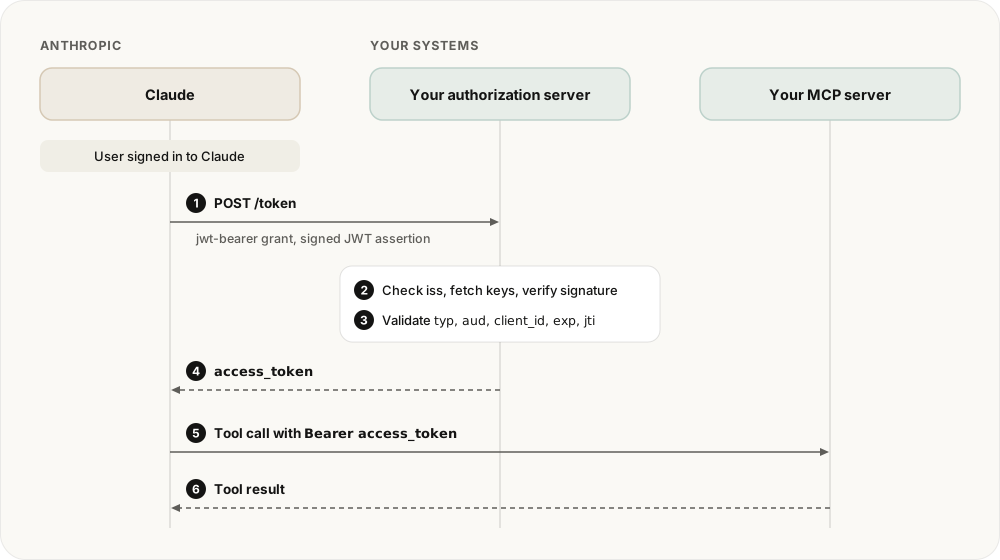
Diagram of the EMA flow. Source: Anthropic.
The MCP Enterprise-Managed Authorization extension defines the broader pattern. Claude's guide adds the client-specific requirements, including its behavior with lazy authentication and the client registration methods it supports.
Who signs the assertion?
There are two paths. With identity provider-issued assertions, the customer's provider signs for a user who entered Claude through company SSO. With Claude-issued assertions, Claude signs under an issuer URL specific to that Claude organization. Anthropic currently labels the Claude-issued path beta.
The issuer URL matters more than the logo on the sign-in screen. Your authorization server must associate the exact issuer with one customer workspace. It must reject an assertion that resolves to no workspace or ambiguously to several. For Claude-issued assertions, the opaque subject does not match a subject from your own SSO system, so Anthropic directs servers to find an existing workspace member by verified email. For identity provider-issued assertions, match the issuer and subject to the member's SSO identity.
What must the authorization server check?
The token endpoint must accept urn:ietf:params:oauth:grant-type:jwt-bearer and advertise that grant in its authorization server metadata. It then needs to verify the trusted issuer, fetch the issuer's keys, validate the signature and token type, check the audience and client ID, enforce the time window, and reject a reused jti. Anthropic's validation checklist gives the precise order and failure behavior.
The access token should be scoped to the resolved customer workspace. Claude requests a fresh assertion when that access token expires, so this grant does not need a refresh token. Token lifetime still matters: an already issued access token can remain valid after a member loses access to the Claude organization.
Your MCP server's authorization server should support Client ID Metadata Documents (CIMD) for OAuth client registration. Claude does not support Dynamic Client Registration (DCR) for Enterprise Managed Auth. Anthropic also supports a client pre-registered for your server's URL. In either case, the client ID in the assertion must match a client your authorization server recognizes.
How should you test it?
Use a Claude Team or Enterprise test organization and run a tool call from an eligible member. Confirm that the token endpoint receives the JWT bearer request, the MCP server receives an access token for the correct workspace, and the member does not see an extra consent step. Then check rejection cases: an unknown issuer, wrong audience or client ID, expired assertion, repeated jti, and a member who does not belong to the resolved workspace.
Keep the ordinary MCP authentication flow available where you need it. If you're testing a connector in several clients, the cross-client authentication test guide helps separate an authorization failure from a tool failure.
FAQ
Does Claude-managed auth replace company SSO?
No. Identity provider-issued assertions use the customer's SSO identity, while Claude-issued assertions use membership in the customer's Claude organization. Anthropic warns that a Claude-issued assertion alone does not prove the member used the customer's SSO or multi-factor authentication.
Can an MCP server enable auto-connect by changing only its tool code?
Usually no. The authorization server must accept and validate ID-JAG assertions, and a customer administrator must register the trusted issuer. The MCP server still needs to enforce the permissions attached to the access token it receives.
If you're designing an MCP connector for Claude, start with Anthropic's implementation guide and test the full exchange with a real organization before requesting an Auto-connect label for a directory listing.