Why MCP quality matters
An agent can connect to your MCP server and still fail the user. It may see a tool called search whose description never says what it searches, or send an argument your schema accepts and get back a result it cannot use.
When we launched the Manufact MCP leaderboard, server builders started asking us to include their servers. I like that people want their work to be found. Developers choosing a server should also see more than a name and a logo. A public score lets them inspect the tool surface before connecting it, and gives the builder specific things to fix.
What the MCP quality score measures
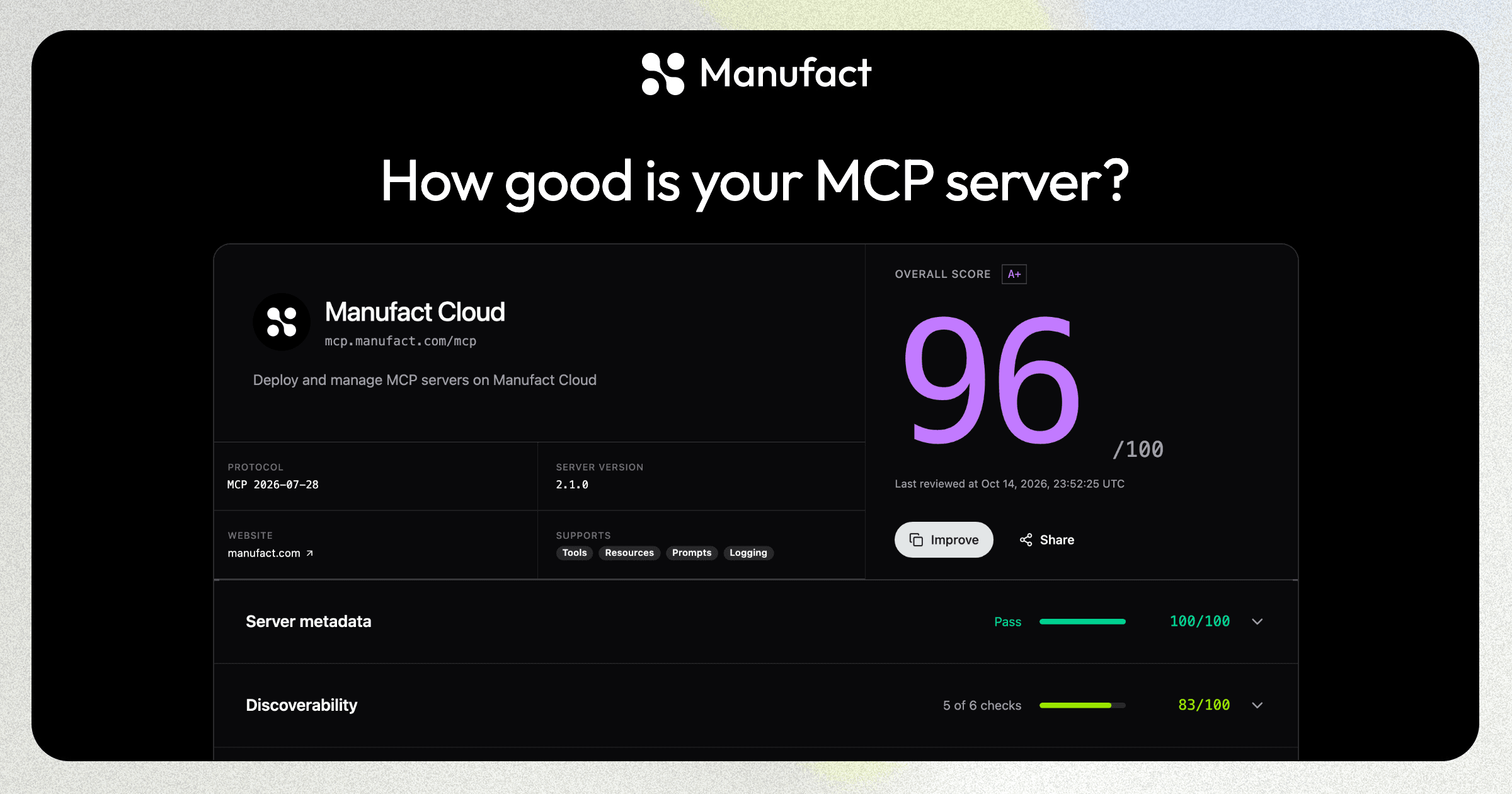
Paste a public or OAuth-protected HTTPS MCP URL into the MCP leaderboard's free scorer. Manufact connects to the server, discovers its tools, and checks whether users can find it. The score has five categories with equal weight:
| Category | Weight | What the review looks at |
|---|---|---|
| Tool documentation | 20% | Titles, descriptions, inputs, output schemas, and behavior annotations |
| Tool definitions | 20% | The structure of the tools the server exposes |
| Protocol compatibility | 20% | Whether the server negotiates and exposes MCP capabilities as expected |
| Server metadata | 20% | Information that helps a client and a developer understand the server |
| Discoverability | 20% | Store listings and public setup information for the server |
If your server includes MCP Apps, the review adds an Apps category and all six share the score equally, about 16.7% each. A server without Apps gets no penalty. Required categories that cannot be assessed earn zero points. Older reports keep the weighting they were published with. The MCP leaderboard FAQ explains the weighting and the report fields.
The review scores every tool the server returns. On the report, you can see how many tools were discovered and how many documentation reviews finished. A tool that couldn't be reviewed still appears in that count, so check coverage before comparing two scores.
How the discoverability score works
Discoverability measures whether people can find and install your server outside the leaderboard. It has six checks with equal weight. Four look for a store listing:
- Claude connectors directory. A Verified listing earns full credit and a Community listing earns half.
- ChatGPT apps directory.
- Cursor marketplace, which Grok and Grok Bot also use.
- Muse connector platform.
The other two look at your own web presence:
- An
mcp.jsonmanifest on your main domain, at/mcp.jsonor/.well-known/mcp.json, that declares the server's exact endpoint. - Setup instructions served at the MCP URL when someone opens it in a browser.
A listing only counts when Manufact can match it to your server. Checks that can't be verified earn no credit. If none of the six can be verified, the score leaves Discoverability out.
Unfortunately, discoverability is not an easy fix, and the report's fix prompt won't solve it. A coding agent can add the manifest and the setup page, but each store listing goes through that store's own submission and review. Our guide to distributing an MCP server across ChatGPT, Claude, Muse, Grok, and Cursor walks through each submission.
Read the report before you chase the number
Open the sections with failed checks. For tool documentation, the report calls out unclear titles, descriptions, input fields, annotations, and output schemas. Suppose a tool named search accepts query and limit, but its description never tells the agent whether it searches customers or support tickets. Describe the actual task and make the inputs match the implementation.
For the code-level sections, you can copy a suggested fix prompt into your coding agent, review the change, deploy it, and run the score again. Manufact does not edit your server during the public review. It reads tool metadata, app resources, and public web pages without executing your tools.
The MCP leaderboard ranks curated servers by quality score. Use it to browse servers and inspect their reports. Curation and score are separate. A high score is feedback on the measured surface, and it doesn't mean a server is safe or reliable for your task.
What a score cannot tell you
A metadata review cannot prove that create_issue creates the right issue or that an agent picks the right tool in ChatGPT and Claude. It also can't confirm that OAuth works for every user. The public report checks whether a server is listed in each store, but it does not run end-to-end client checks or predict marketplace approval.
After fixing the report's findings, run a task your users would ask for. Check the result and the tool calls in the clients you support. Manufact cross-client testing runs the same task in clients such as ChatGPT and Claude; our testing walkthrough shows how a server can pass in one agent and fail in another.
If you are preparing to publish into Claude Connectors, ChatGPT Plugins, or the Muse Connector Platform, the Manufact publishing checks cover more than the public score. The publishing checks docs explain the dashboard checklist and its end-to-end checks.
Need help improving your MCP quality score?
Let's improve your MCP quality score
Bring us your report and the task your users need to complete. We can help you work through the findings and test the fixes in the clients you support.
FAQ
Do I need a Manufact account to score my MCP server?
No. Paste its HTTPS MCP URL into the free MCP quality scorer. If the server requires OAuth, complete the authentication prompt. Your score, tool metadata, and feedback will appear on the public MCP leaderboard, so review what the report will expose before submitting a private integration.
Should I rerun the score after changing a tool description?
Yes. Deploy the updated server, then start a new review. Check the new tool feedback and the reviewed-tool count. A score can move when the server's discovered tools or metadata change.
My server is listed in a store, but the report doesn't show it. Why?
Manufact matches a store listing to your server by your website's domain and your server or brand name. Declare your website in the server's MCP metadata (websiteUrl) and use a matching name in the store listing. Store results come from directory snapshots that refresh about once a day, so a new listing can take a few days to appear when you rerun the review.
If you have an MCP URL ready, score it on the MCP leaderboard and start with the failed check you can verify against your implementation.