

Wave by Vento, formerly Italian Tech Week, brought 10,000 founders, investors, and tech operators to OGR Torino on October 7–9, 2026. To help them decide how to spend their time, Wave's team partnered with Manufact to build a conference MCP server: a connection that let attendees ask ChatGPT or Claude about the event using current program information.
Attendees could search talks and side events, ask about logistics, and build a schedule around their interests inside their favorite LLM. Manufact built the server with mcp-use, hosted it on Manufact Cloud, and handled publishing to both the ChatGPT Plugins and Claude Connector directories. Across the launch and event reporting period, the server handled 32,223 tool calls.
Wave became one of the first major European tech conferences to offer an official MCP server. For its event team, the immediate goal was to make a busy program easier to navigate.
Help attendees find the right sessions
Before the MCP launch, attendees had to manually search for event information on the Wave website and in the official app. Wave's team wanted a more efficient way for attendees to explore Wave through the LLMs they used each day, and decided the best way to do this was with an MCP server. Elena Calconi, Event Manager at Wave by Vento, described wanting users to be able to ask questions such as which AI sessions to attend on Thursday, or how to build an agenda around an interest in the physical economy, including relevant side events.
Now, with the MCP server, an attendee can describe their interests and available time, then ask follow-up questions about a speaker or session. The AI assistant then would retrieve the relevant event information and use it to suggest a personal schedule.
Manufact handled the build and hosting
“Our team’s job was to gather all the information attendees would need, like the agenda, speakers and practical details, into one single document. Manufact took it from there and handled the whole technical side, from building the MCP to making it available on both platforms.”
Elena Calconi, Event Manager, Wave by Vento
Manufact hosted Wave's server on Manufact Cloud, with a public HTTPS endpoint that ChatGPT and Claude could connect to. Our team powered the MCP through the launch and conference, including the busiest day, when attendees' assistants made 11,236 tool calls.
Manufact manages the runtime and TLS certificates behind the server. Teams can connect a GitHub repository to deploy changes, with build logs and health checks in the dashboard. That gives Wave's team a way to ship updates to their MCP as they prepare for the event.
Manufact Cloud also gives teams controls for testing and recovering releases:
- Branch previews: each branch gets its own MCP URL, so your team can try changes in an AI client before merging them into production.
- Deployment history and rollback: review the source revision and logs for a release, then switch traffic to a previous deployment if a change causes a problem.
- Separate configuration: keep production and preview environment variables separate, with encrypted storage for credentials.
Getting Wave's MCP published on ChatGPT and Claude
Manufact handled both directory submissions and followed the reviews through to publication. Our team kept the submission current as the server changed and worked with OpenAI and Anthropic on review timing to meet the conference deadline.
Conference teams preparing a launch can also use Manufact's publishing checks to inspect protocol behavior, tool definitions, security, and listing requirements before review. The submission pack generates draft listing copy, reviewer test cases, and visual assets from the server. Our ChatGPT publishing guide walks through the submission process.
How attendees used Wave's MCP
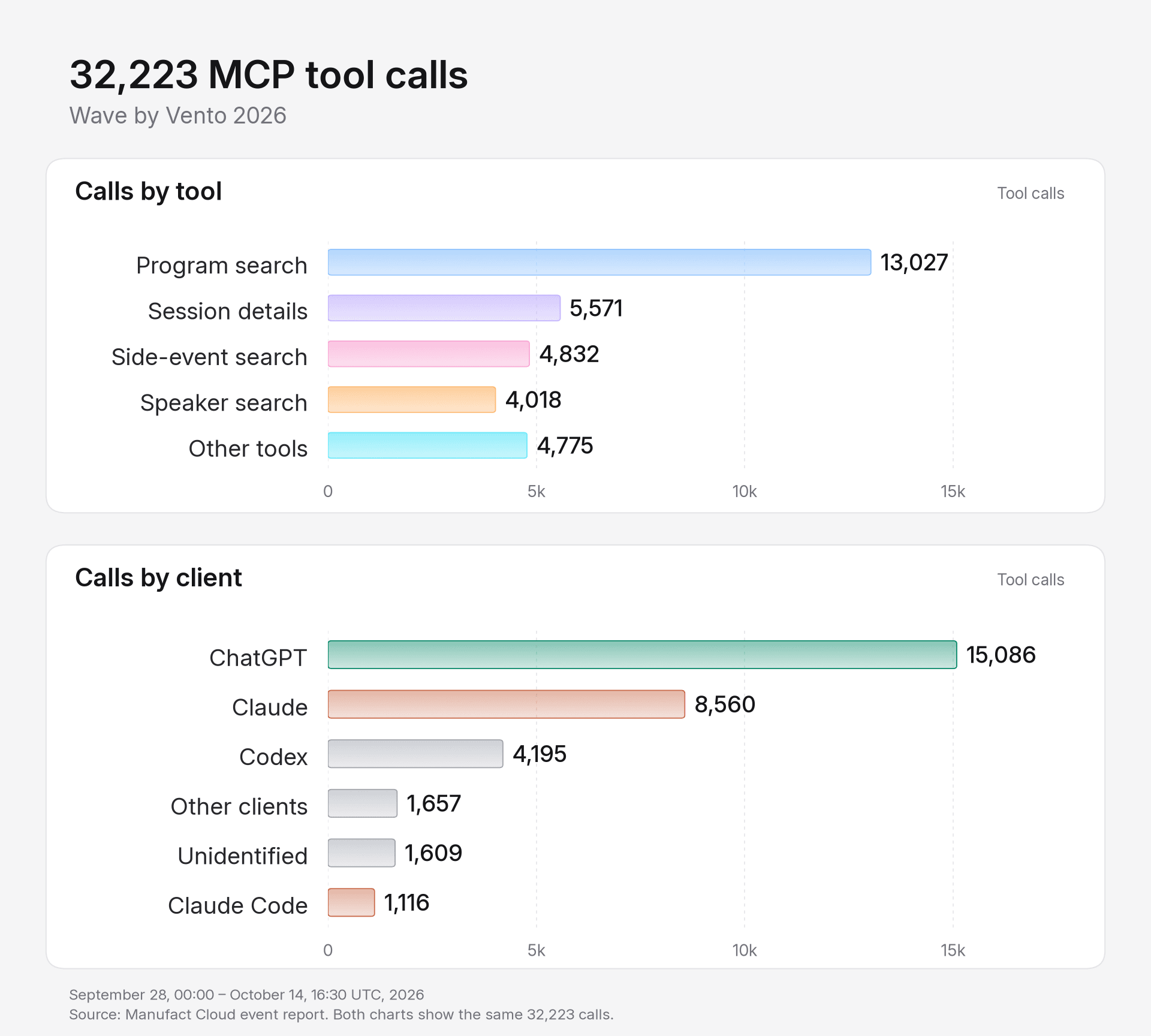
The same 32,223 calls, grouped by tool and by client. “Other tools” combines calls outside the four most-used tools.
Manufact's analytics showed the event managers where attendees got the most value out of the server. Program search was the most-used tool, with 13,027 calls. Attendees' assistants also made 5,571 calls for session details, 4,832 side-event searches, and 4,018 speaker searches.
| Measure | Result |
|---|---|
| Total tool calls | 32,223 |
| Successful tool calls | 31,871 |
| Calls that returned an error | 352 |
| Distinct users identifiable across ChatGPT and Codex | 784 |
| ChatGPT and Codex sessions with at least one call | 1,332 |
| Peak day, October 6 | 11,236 tool calls |
Manufact Cloud analytics identified 784 distinct users across ChatGPT and Codex, with additional usage from Claude and other clients whose users could not be counted across the period.
ChatGPT accounted for 15,086 calls and Claude for 8,560. Codex contributed another 4,195 calls, with the remainder coming from Claude Code, other clients, or unidentified clients.
Once attendees started using the server, Manufact's analytics tracked tool usage and errors. Teams running their own event MCP can use the usage and traffic dashboard to monitor those measures during the launch and event.
In Manufact, you can investigate the MCP at the level of an individual tool and client:
- Tool-by-client analytics: compare usage, error rates, and latency for each tool across ChatGPT, Claude, and other clients. Check whether a tool fails more often in one client or which capabilities attendees use most.
- Error alerts: set thresholds for tool failures and receive email or Slack notifications when they trigger. Your team can configure alerts around the tools it needs to watch during the event.
- Request traces: open a request in Cloud Inspector to inspect its client, status, timing, and MCP method, then follow the session behind an error.
- Sessions: review the sequence of tool discovery, calls, and errors in the session timeline. You can move from an analytics view to the matching sessions to investigate what happened.
Build an MCP for your conference
If you are considering an MCP server for your conference, start with the questions your support team receives and the decisions attendees need to make. Wave's team supplied that event knowledge and reviewed the experience while Manufact handled the build, hosting, and marketplace submissions.
Questions from conference organizers
What should we test before promoting an event MCP?
Try questions from your support inbox and ask for a schedule based on a specific interest and day. Compare the answers with your approved program, check local times, and try a question with no matching session. After publishing, test the links attendees will use from your website and app.
Do we need a finished agenda or an API to start?
You can start with the information you have. Wave shared a master document and agenda exports before its program was final. Bring your existing event data and the questions attendees ask most, then agree with your technical partner on how to keep that information current.
If you run a conference and want attendees to plan their visit through ChatGPT or Claude, talk with Manufact about your event MCP.