Agentic workflows are getting more autonomous and more parallel. The loop only closes if the agent can verify its own work. Agents need to be able to look at what they built, decide whether it matches what was asked, and iterate. Regular web apps fit that loop fine.
MCP Apps don't. They render inside a sandboxed iframe that needs host-provided context before the app even mounts. You can't just go to a URL and take a screenshot of the app. Today the alternative is having the agent drive an MCP Inspector in a real browser, which is slow and awkward.
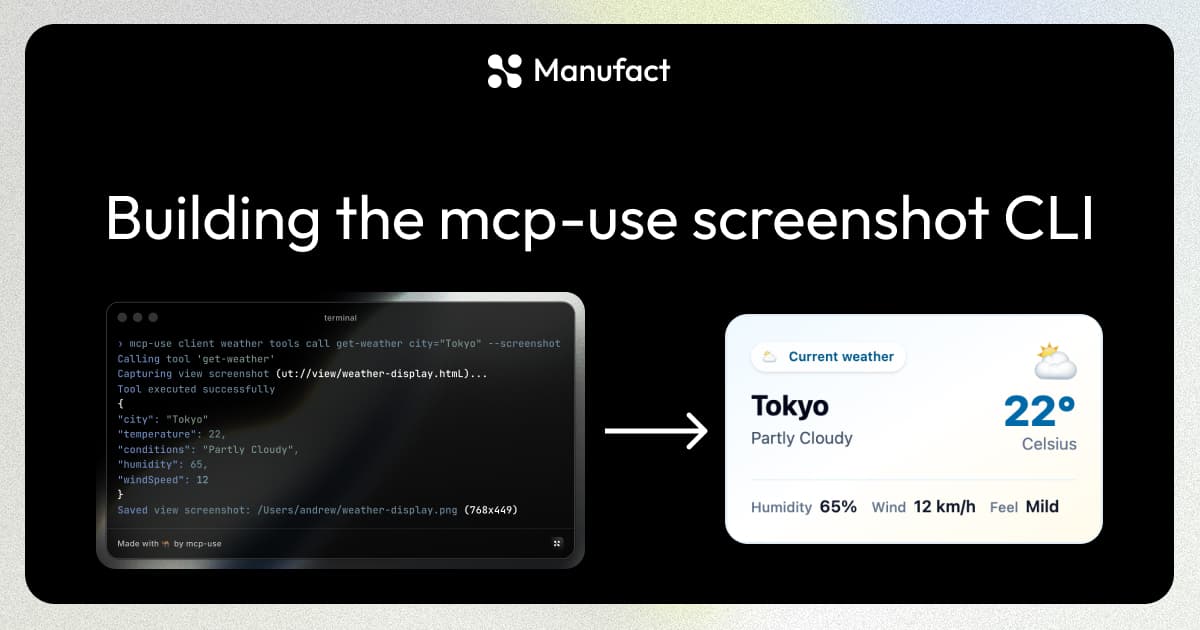
mcp-use client screenshot closes the loop. It renders an MCP App headlessly and writes a PNG to disk, so an agent can take a screenshot the same way it'd run a test.
How to use it
The new mcp-use CLI ships with a built-in MCP client, so you or an agent can connect to a server and call tools, prompts, or resources straight from the shell. When the tool you call renders an MCP App, you can screenshot it. OAuth works interactively.
- Connect:
mcp-use client connect <name> <url> - Screenshot a tool's view:
mcp-use client <name> screenshot --tool <tool> arg1=val1 arg2=val2 - Or fold it into a tool call:
mcp-use client <name> tools call <tool> arg1=val1 arg2=val2 --screenshot
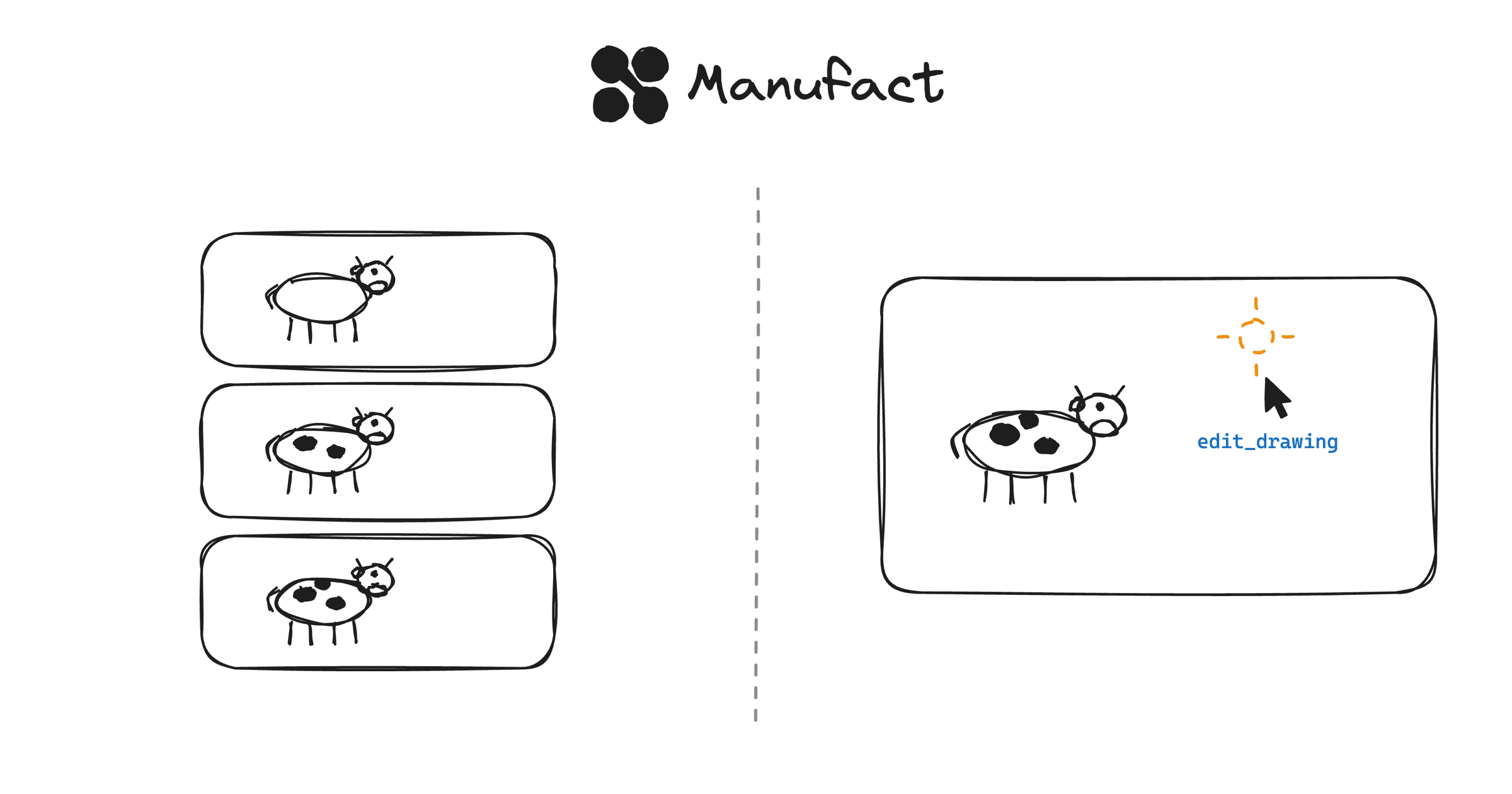
As an example of an agent being able to verify its work, we can use the Excalidraw MCP App as an example. See below where Claude uses the CLI to draw a Cow and shows us.
You can also see how powerful this visual feedback loop is in Vibe. Our vibe coding platform for building MCP Apps.
How we built it
The CLI already ships its own MCP client, and the Inspector already knows how to render MCP Apps. MCP Apps are portable: the server ships the HTML, the client renders it. So we just need to hand the Inspector's renderer the same payload it'd normally get from a live server.
Spin up a headless Chrome pointed at a special /inspector/preview/<view> route. Inject the tool result and the View's HTML bundle as a global before any page script runs. The Inspector reads that global on mount and renders the View through the same MCP App renderer it uses everywhere else. Take the screenshot, write the PNG, print the path.
Our custom Chrome DevTools Protocol pipeline
We didn't want Playwright as a hard dependency, so the pipeline talks to Chrome directly over CDP. You just need a Chromium-based browser installed.
When you run a screenshot command, the CLI's built-in client calls the tool, then reads the UI resource the tool points at. It bundles all of that into a single object:
interface ScreenshotBundle {
  resourceUri: string;
  resourceContents: unknown;
  toolInput?: Record<string, unknown>;
  toolOutput?: unknown;
}
This bundle is the contract between the CLI and the Inspector. The browser only ever uses the bundle to render; it never connects to the MCP server.
To boot the renderer, the CLI spawns a fresh @mcp-use/inspector on a random free port and a headless browser. The CLI then has a minimal CDP client in it that interacts with the web browser over JSON-RPC via WebSockets in order to control the browser. The resource HTML is often hundreds of KB of arbitrary user code, so a query param was out. Instead, we inject it as a global, before any page script runs:
const payload = JSON.stringify(JSON.stringify(opts.bundle));
await cdp.send(
  "Page.addScriptToEvaluateOnNewDocument",
  {
    source: `globalThis.__mcpUsePreviewBundle = JSON.parse(${payload});`,
    runImmediately: true,
  },
  sessionId,
);
The double-stringify is a small trick that embeds it as a JSON string literal inside the source text, then JSON.parse it back to an object at runtime. That way we don't have to escape </script>, backslashes, or any of the other characters that would blow up the parser the moment the bundle contains real user HTML.
Once we navigate to /inspector/preview/<view>, the Inspector's ViewPreview component reads globalThis.__mcpUsePreviewBundle on mount and renders inline. The browser can only see the resource the CLI bundled, it doesn't need a live connection to the server at all.
Escape hatches
The headless-local path is the default. A few flags cover the cases where it isn't what you want.
Authenticated servers. Saved servers reuse whatever auth mcp-use client connect already negotiated, including OAuth. For one-off runs against an authenticated server, use the ad-hoc form with curl-style -H flags:
mcp-use client screenshot \
  --mcp https://api.example.com/mcp \
  -H "Authorization: Bearer $TOKEN" \
  --tool create_chart symbol=AAPL
No local browser (CI, sandboxes). --cdp-url ws://... points the pipeline at any existing CDP socket: Browserbase, Notte, or a headless Chromium container in CI. The remote browser still needs to reach the Inspector, so this is most useful when the Inspector is reachable too, or you're tunneling.
If you're building MCP Apps and having trouble with your agent feedback loop, give it a try with:
npx mcp-use client